What is JKPaySys?

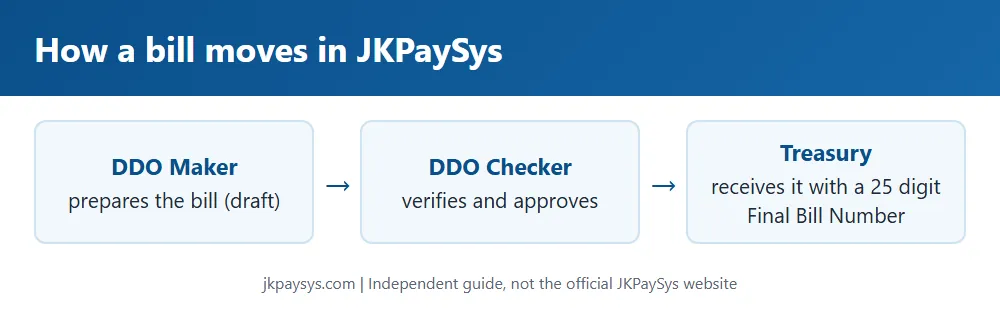
JKPaySys (also known as PayManager) is the official online payroll system used by the Government of Jammu & Kashmir to manage salaries for its employees. Through this system, the Drawing and Disbursing Officers (DDOs) of various departments prepare and process pay bills, DA arrears, bonuses, leave encashment, and other salary-related payments for J&K UT government staff.

In simple terms, JKPaySys is the platform that decides how and when government employees in Jammu & Kashmir get paid. It also allows employees to check and download their monthly salary slips online.
Important Disclaimer:

This website is an independent, unofficial guide created to help J&K government employees understand and use the JKPaySys system more easily. We are not affiliated with the Government of Jammu & Kashmir, NIC, or the official JKPaySys portal.

For login, salary slip downloads, and any account-related action, always use the official JKPaySys/PayManager website directly. Bookmark only the official portal and never enter your credentials on any third-party website.
What's Included in Your JKPaySys Salary Slip?

Your JKPaySys salary slip contains complete salary details including Basic Pay, DA, HRA, allowances, deductions, GPF/NPS contributions, income tax deductions, gross salary, net salary, and employee information. It is commonly used as proof of income for loans, tax filing, and official documentation.

Troubleshooting Salary Slip Download Issues
Problem Possible Reason Fix
Salary slip not generating CPIS data mismatch Ask DDO to verify/update Form 1 & Form 2(A&B) in CPIS
PDF won't open Incomplete download or browser issue Re-download using Chrome; check downloads folder
Slip shows wrong month's data Dropdown selection error Re-select correct month/year and resubmit
"No record found" DDO Code mismatch between CPIS and JKPaySys Report to DDO — DDO codes must match across both systems
How to Download JKPaySys Salary Slip – Step-by-Step Guide
Step 1 – Open JKPaySys Login Portal

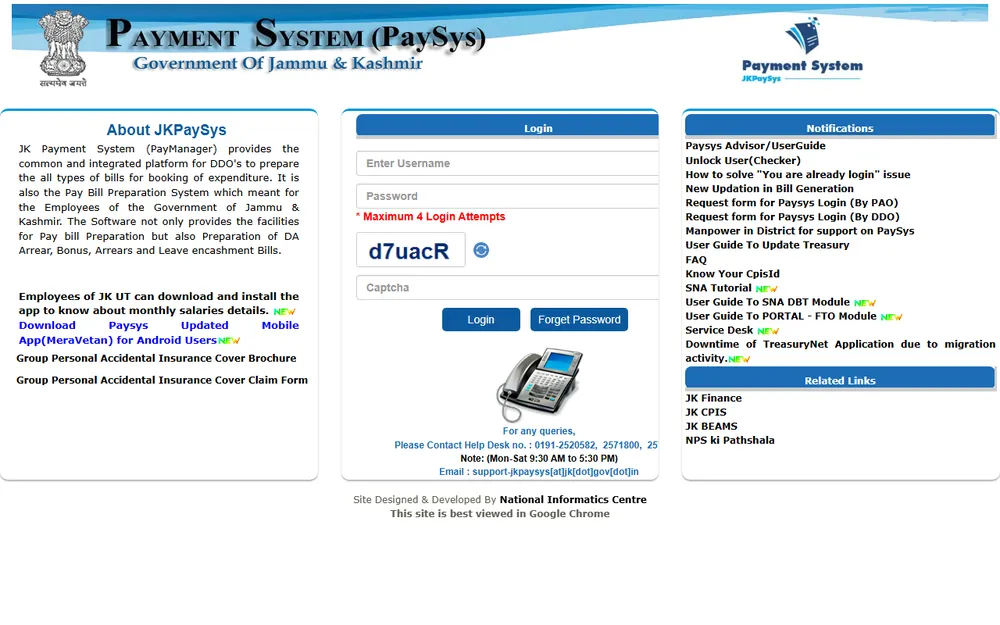
Visit the JKPaySys portal and locate the Login section.

JKPaySys Step 1
Step 2 – Enter Username

Enter your registered JKPaySys username in the Username field.

JKPaySys Step 2
Step 3 – Enter Password

Type your password carefully in the Password field.

JKPaySys Step 3
Step 4 – Complete Captcha Verification

Enter the captcha exactly as displayed on the screen.

JKPaySys Step 4
Step 5 – Click Login

After entering all details correctly, click the Login button.

JKPaySys Step 5
Step 6 – Access Salary Slip Dashboard

Once logged in successfully, access the salary slip section and download the required month’s payslip.

JKPaySys Step 6
Who Uses JKPaySys?

JKPaySys is primarily used by various departments and employees of the Jammu & Kashmir Government for salary management, bill preparation, verification, and payment processing.

  • Government Employees of Jammu & Kashmir UT
    To view and download salary slips, salary details, and payment records.
  • DDOs (Drawing and Disbursing Officers)
    To prepare, manage, and submit employee bills through the portal.
  • PAOs (Pay and Accounts Officers)
    To verify, process, and approve submitted bills and payments.
How to Log In to JKPaySys: Step-by-Step Guide

To log into your JKPaySys account and access salary details, bill status, and employee services, follow the steps below carefully.

  1. Visit the Official Portal
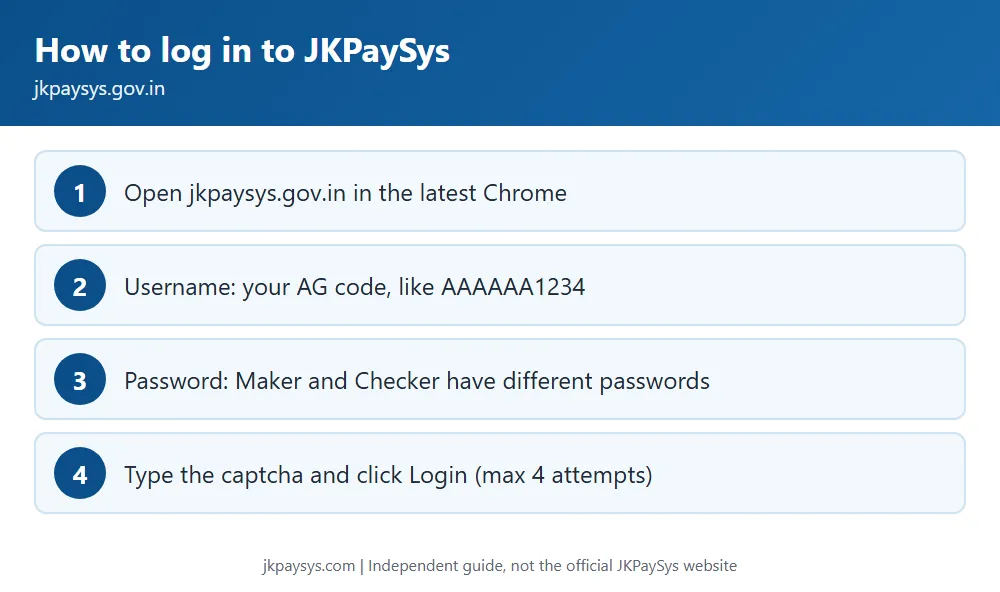
    Open your web browser and visit the official JKPaySys portal at jkpaysys.gov.in. Always use the official website and avoid clicking unknown links received through SMS, WhatsApp, or emails.
  2. Locate the Login Section
    On the homepage, find the login panel containing Username, Password, and Captcha fields.
  3. Enter Your Username
    Type the username provided by your department or DDO during registration.
  4. Enter Your Password
    Carefully enter your account password in the password field.
  5. Fill in the Captcha Code
    Enter the Captcha exactly as displayed on the screen. Government portals generally require accurate case-sensitive entry.
  6. Click Login
    Press the Login/Submit button to authenticate your account.
  7. Access Your Dashboard
    After successful login, you can view salary details, check bill processing status, and download salary slips directly from your dashboard.
Important: Always log in through the official JKPaySys portal and never share your username, password, or OTP with anyone.
Important Things to Keep in Mind
  • You get a maximum of 4 login attempts. After that, your account may get locked and you'll need to contact your DDO or the helpdesk to unlock it.
  • Make sure Caps Lock is turned off before entering your password — this is the most common reason for login failure.
  • Use an updated browser (preferably Google Chrome), as the portal is optimized for it and may not render correctly on outdated browsers.
  • If you're not the one who registered the account, check with your department's DDO for your correct username before assuming it's a password issue.

Common Login Errors and Fixes

Issue Likely Cause What to Do
"You are already logged in" A previous session wasn't closed properly Wait a few minutes and retry, or ask your DDO to force-clear the session. Avoid repeated rapid login attempts.
Login attempts exhausted Wrong password entered 4 times Contact your DDO/PAO or the helpdesk to reset or unlock your account.
Page not loading correctly Outdated browser Switch to the latest version of Google Chrome.
Captcha mismatch Misreading captcha or autofill issues Refresh the captcha and type it manually. Avoid copy-paste.

Need Help?

If you're still unable to log in, the official helpdesk is your best next step. Your DDO or PAO can also raise a request on your behalf for login credential issues.

Need Help?

If you're still unable to log in, the official helpdesk is your best next step. Your DDO/PAO can also raise a request on your behalf for login credential issues.

How to Download Your JKPaySys Salary Slip (PDF)

Once you're logged into the official JKPaySys portal, downloading your monthly salary slip takes just a few clicks.
Method 1: Download After Login
1

Log in to the official portal using your username, password, and captcha.

2

On your dashboard, locate the Salary Slip or Pay Slip option.

3

Select the month and year for which you want the salary slip.

4

Click Show/View to preview the salary slip.

5

Click the Download/Print icon to save the PDF.

6

Open the downloaded file and verify salary details, deductions, and net pay.

Method 2: Download Without Logging In (Employee Code Method)
1

Open the official portal homepage.

2

Locate the separate Salary Slip option.

3

Enter your Employee Code.

4

Enter your First Name exactly as registered in CPIS records.

5

Select the required month and year.

6

Enter the captcha and click Submit/Show.

7

When the salary slip appears, click Download to save the PDF.

What's Included in Your JKPaySys Salary Slip?

A typical JKPaySys salary slip PDF contains complete salary details, earnings, deductions, and employee information required for official verification.

  • Basic Pay, Grade Pay, and Pay Level
  • Dearness Allowance (DA), HRA, and Other Allowances
  • Deductions — GPF/NPS, Income Tax, Professional Tax, etc.
  • Net Pay (Take-Home Salary)
  • DDO Code and Employee Details for Verification
What's Included in Your JKPaySys Salary Slip?

Your JKPaySys salary slip contains detailed information about your monthly salary, including basic pay, allowances, deductions, gross salary, net salary, GPF/NPS contributions, income tax deductions, and employee details. It serves as an official proof of income and is commonly required for loans, tax filing, and employment records.

Troubleshooting Salary Slip Download Issues
Problem Possible Reason Fix
Salary slip not generating CPIS data mismatch Ask DDO to verify/update Form 1 & Form 2(A&B) in CPIS
PDF won't open Incomplete download or browser issue Re-download using Chrome; check downloads folder
Slip shows wrong month's data Dropdown selection error Re-select correct month/year and resubmit
"No record found" DDO Code mismatch between CPIS and JKPaySys Report to DDO — DDO codes must match across both systems

Frequently Asked Questions (FAQ)

Find answers to common questions about JKPaySys login, salary slips, password recovery, and employee services.

1. What is JKPaySys?
JKPaySys, also known as PayManager, is the official online payroll system used by the Government of Jammu & Kashmir to prepare pay bills and manage salary-related payments for UT government employees.
2. How do I log in to JKPaySys?
Visit the official portal at jkpaysys.gov.in, enter your username, password, and captcha code, then click Login. Users receive a maximum of 4 login attempts before the account may be temporarily locked.
3. How can I download my JKPaySys salary slip in PDF format?
After logging in, open the Salary Slip section, select the desired month and year, click Show, then use the Download or Print option to save the salary slip as a PDF file. Some employees may also access salary slips using Employee Code and registered first name.
4. I forgot my JKPaySys password. What do I do?
Contact your DDO (Drawing and Disbursing Officer) or the official support team. Password resets are generally handled by the concerned department rather than through self-service recovery.
5. Why does it say "You are already logged in"?
This message usually appears when a previous session was not closed correctly. Wait a few minutes and try again. If the issue continues, ask your DDO or administrator to clear the active session.
6. Can I download my salary slip without logging in?
Yes. Many employees can access salary slips using their Employee Code and registered first name without a full portal login, depending on available portal options.
7. Why is my salary slip not generating?
Salary slip generation issues often occur because of mismatched CPIS records, incorrect DDO codes, or outdated employee information. Contact your DDO to verify and update records.
8. Is there a mobile app for JKPaySys?
Yes. Employees can use the official MeraVetan mobile application to view monthly salary details and related information on Android devices.
9. Who do I contact for JKPaySys login or technical issues?
Your department's DDO or PAO is generally the first point of contact. They can escalate unresolved login or technical issues to the official JKPaySys helpdesk.
JKPaySys Mobile App — MeraVetan

For employees who prefer checking salary details on the go, the MeraVetan app is the official mobile companion to the JKPaySys portal.

What You Can Do on the App

  • View your monthly salary breakdown
  • Check DA arrears, bonus, and leave encashment details
  • Access basic employee pay information without opening a browser

How to Get the App

  1. Open the Google Play Store on your Android device.
  2. Search for "MeraVetan".
  3. Verify the publisher/developer details match the official J&K Government release before installing.
  4. Install and open the app.
  5. Log in using the same credentials you use on the JKPaySys web portal.
⚠️ Safety Note: Only install government payroll apps from the official Play Store listing, and double-check the developer name before granting login access. Avoid APK files shared through unofficial links, as fake apps mimicking government portals are a known risk.

App Not Working? Try This

Issue Fix
Login fails on app Confirm credentials work on the web portal first.
App not found on Play Store Check device region and Play Store country settings.
App crashes after login Update to the latest version, clear cache, or reinstall.
Group Personal Accidental Insurance Cover for JKPaySys Employees

J&K Government employees registered under JKPaySys are also covered under a Group Personal Accidental Insurance (GPAI) scheme. The scheme is designed to provide financial protection and support in the event of accidental injury, disability, or death while in service.

What This Covers

  • Accidental death benefit
  • Permanent total disability benefit
  • Permanent partial disability benefit
  • Coverage applicable to employees registered through the JKPaySys / CPIS system
Employees enrolled through the JKPaySys and CPIS systems can avail the benefits of this insurance scheme, ensuring financial security for themselves and their families in unforeseen circumstances.
How to Access the Brochure and Claim Form

The official JKPaySys portal provides important insurance-related documents for employees and their nominees.

📘

GPAI Cover Brochure

Outlines coverage amount, eligibility criteria, benefits, exclusions, and policy terms under the Group Personal Accidental Insurance Scheme.

📄

GPAI Claim Form

Required for claim submission and must be completed by the employee or nominee in the event of an eligible insurance claim.

Important: Both documents are available for download directly from the official portal under the Notifications / Insurance section. Employees and nominees should always download the latest version to ensure they are using the most current scheme guidelines and insurance terms, as policy provisions may be revised periodically.
Filing a Claim – General Process
1
Download the latest GPAI Claim Form from the official portal.
2
Fill in employee and incident details accurately.
3
Attach supporting documents (medical/death certificate, FIR copy if applicable, etc.) as specified in the claim form.
4
Submit through your DDO/department as per the process outlined in the brochure.
Important: Claim procedures and required documents may be updated by the Finance Department. Always refer to the latest brochure available on the official portal instead of relying on previously downloaded copies.
Need Help? Contact & Support

Official Helpdesk

  • Phone: 0191-2520582, 2571800, 2571900
  • Timing: Monday–Saturday, 9:30 AM – 5:30 PM
  • Email: support-jkpaysys[at]jk[dot]gov[dot]in

Before You Call

  • Your Employee Code / CPIS ID
  • Your DDO Code and Department Name
  • Clear description of the issue
  • Screenshot of the error (if available)
Escalation Path for Most Issues
1

DDO (Drawing & Disbursing Officer)

First point of contact for login resets, CPIS data mismatches, and employee information issues.

2

PAO (Pay & Accounts Officer)

Handles bill processing, payment-related concerns, and treasury matters.

3

Official Helpdesk

Contact for technical portal issues that cannot be resolved by DDO or PAO.

Important Notice

Always access JKPaySys only through the official portal (jkpaysys.gov.in) or the official MeraVetan app from the Play Store.

This site is an independent guide meant to help employees navigate the system more easily. We do not host login forms, collect credentials, or process any salary data ourselves.

Ethan

Ethan is an SEO content writer who creates simple, easy-to-follow guides on JKPaySys, PayManager, salary slips, employee services, and government portals to help users find accurate information quickly.