
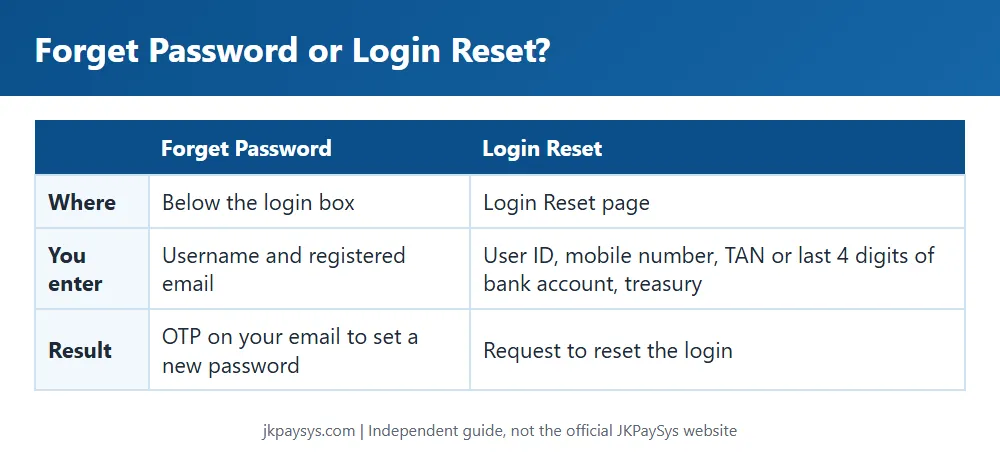
Locked out of JKPaySys? There are two ways back in. Forget Password sends an OTP to your registered email. Login Reset, linked as Unlock User (Checker), is a separate page. It asks for your user ID, mobile number and treasury, plus either your TAN number or the last 4 digits of your bank account.
How to use Forget Password
- Open jkpaysys.gov.in.
- Click the Forget Password button next to the Login button.
- Enter your username (your AG code) and the email registered with your JKPaySys account.
- Enter the OTP you receive by email and set a new password.
How to use Login Reset
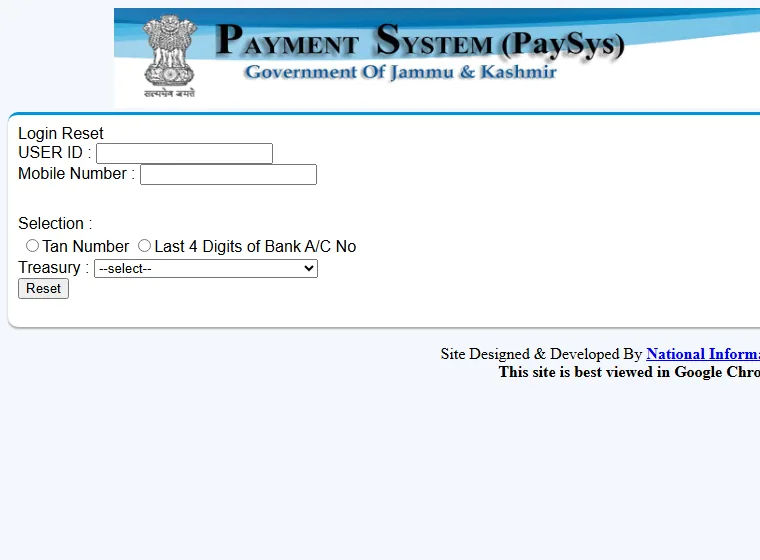
- Click Unlock User (Checker) under Notifications on the official site. This opens the Login Reset page.
- Enter your user ID and mobile number.
- Choose TAN number or last 4 digits of bank account, and enter it.
- Select your treasury and click Reset.
Login attempts and OTP
The official site allows a maximum of 4 login attempts. For receiving OTP, both Maker and Checker should install the Sandes app on the same mobile number updated in JKPaySys.
Unlock user and “already logged in”
For the “You are already login” error, the official site has a PDF called “How to solve ‘You are already login’ issue” under Notifications. Find it on jkpaysys.gov.in, or call the helpdesk.
JKPaySys not working? Check these first
- Browser: the official guide says to use the latest Google Chrome or Internet Explorer, and the site footer says it is best viewed in Chrome.
- Pop-ups: allow pop-ups for jkpaysys.gov.in in your browser settings.
- First login: Maker and Checker each reset their password using the default password sent to them by email.
- No OTP: for Forget Password, check the email registered with your account. For other OTPs, check that the Sandes app is on the mobile number updated in JKPaySys.
- Still stuck: email support-jkpaysys@jk.gov.in with your AG code and a screenshot of the error, or raise it on the NIC Service Desk at servicedesk.nic.in.
Keep your password safe
- Change your Maker and Checker passwords at least once a month, as the official guide advises.
- Never share your password or OTP, including with anyone who says they work for the helpdesk.
- This website never asks for your login details.
Helpdesk: 0191-2520582, 2571800 and 2571900, Monday to Saturday, 9:30 am to 5:30 pm, support-jkpaysys@jk.gov.in. More in our helpdesk guide.