
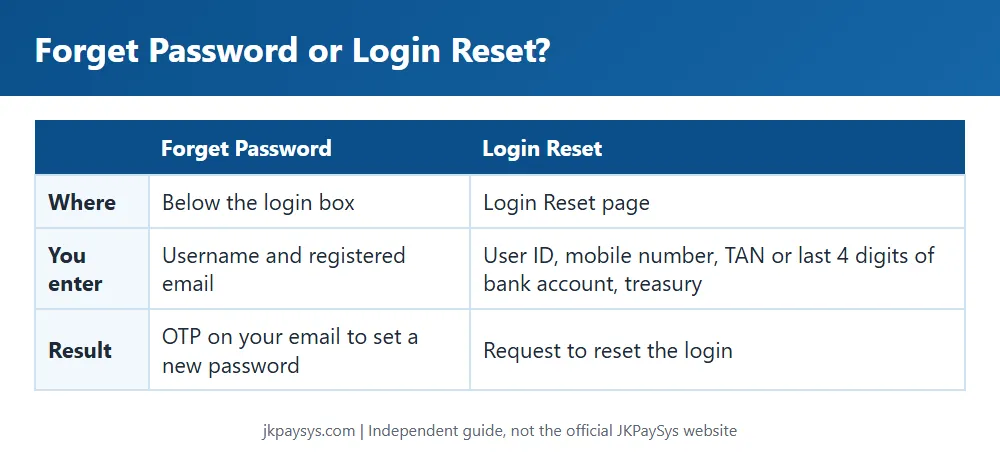
Locked out of JKPaySys? There are two ways back in. Forget Password sends an OTP to your registered email. Login Reset is a separate page that asks for your user ID, mobile number, TAN number or the last 4 digits of your bank account, and treasury.
How to use Forget Password
- Open jkpaysys.gov.in.
- Click the Forget Password button next to the Login button.
- Enter your username (your AG code) and the email registered with your PaySys account.
- Enter the OTP you receive by email and set a new password.
How to use Login Reset
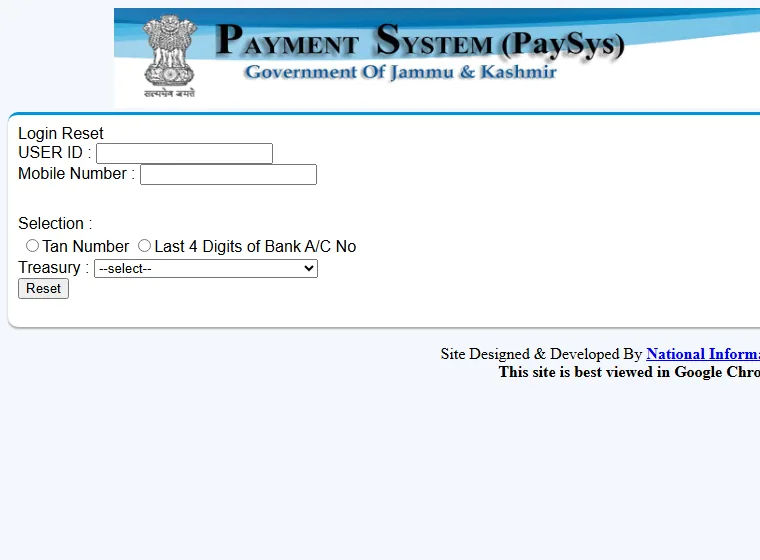
- Click Unlock User (Checker) under Notifications on the official site. This opens the Login Reset page.
- Enter your user ID and mobile number.
- Choose TAN number or last 4 digits of bank account, and enter it.
- Select your treasury and click Reset.
Login attempts and OTP
The official site allows a maximum of 4 login attempts. For receiving OTP, both Maker and Checker should install the Sandes app on the same mobile number updated in JKPaySys.
Unlock user and “already logged in”
Under Notifications, the official site has an Unlock User (Checker) link, which opens the Login Reset page, and a separate PDF called “How to solve ‘You are already login’ issue”. Use these on jkpaysys.gov.in, or call the helpdesk.
Keep your password safe
- Change your Maker and Checker passwords at least once a month, as the official guide advises.
- Never share your password or OTP, including with anyone who says they work for the helpdesk.
- This website never asks for your login details.
Helpdesk: 0191-2520582, 2571800 and 2571900, Monday to Saturday, 9:30 am to 5:30 pm, support-jkpaysys@jk.gov.in. More in our helpdesk guide.